dev
Java Basics - Java GUI
Java GUI
Desktop GUI applications
- AWT(Abstract Window Toolkit)
- Swing(Java Foundation Classes)
- Pluggable Look and Feel
- Platform Independent components
- Enhanced component library
Swing v.s. AWT
- AWT is a Java interface to native system GUI code present in your OS. It will not work the same on every system, although it tries.
- Swing is a more-or-less pure-Java GUI. It uses AWT to create an operating system window and then paints everything else on it.
- Thus Swing is 100% portable and is the same across platforms.
AWT Packages
- java.awt
- GUI container classes
- Frame
- Panel
- Dialog
- ScrollPane
- GUI component classes
- Button
- TextField
- Label
- Layout managers
- BorderLayout (Positions), default for Frame
- FlowLayout (Alignments), default for Panel / Applet
- GridLayout
- CardLayout, add panels/cards one behind the other
- NullLayout, custom
- Custom graphics classes
- Graphics
- Color
- Font
- java.awt.event
- Event classes
- ActionEvent
- MouseEvent
- KeyEvent
- WindowEvent
- Event listener interfaces
- ActionListener
- MouseListener
- KeyListener
- WindowListener
- Event listener adapter classes
- MouseAdapter
- KeyAdapter
- WindowAdapter
Container
Top Lever Containers
- Frame
- Dialog
- Applet Secondary Containers
- Panel
- ScrollPane
Frame
By default, frame’s size is (0,0) and visibility is false;
f = new Frame();
f.setSize(500, 500);
f.setVisible(true);
Event Handing
- Component (source/listener object)
- Button
- Label
- List
- Checkbox
- Choice
- TextField
- Event
- Listener Work Flow
- create Source Object (e.g. create a button)
- create Listener Object (e.g. implement listener interface, override actionperformed method)
- register Listener to Source (e.g. button.addActionListener(l))
- wait for user to trigger the ActionListener -> (e.g. button create a new Event and invoke the actionperformend mehtod of the Lister Object)
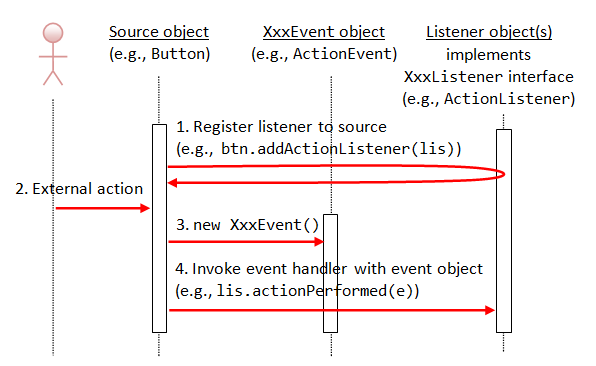 notice: Listener interfaces are abstract, must override all methods; to avoid using interface, we can use(extends) the adapter (class)
Example
code source from https://www3.ntu.edu.sg/home/ehchua/programming/java/J4a_GUI.html
import java.awt.*; // Using AWT layouts
import java.awt.event.*; // Using AWT event classes and listener interfaces
import javax.swing.*; // Using Swing components and containers

// A Swing GUI application inherits from top-level container javax.swing.JFrame
public class SwingCounter extends JFrame { // JFrame instead of Frame
 private JTextField tfCount; // Use Swing's JTextField instead of AWT's TextField
 private JButton btnCount; // Using Swing's JButton instead of AWT's Button
 private int count = 0;

 // Constructor to setup the GUI components and event handlers
 public SwingCounter () {
 // Retrieve the content-pane of the top-level container JFrame
 // All operations done on the content-pane
 Container cp = getContentPane();
 cp.setLayout(new FlowLayout());

 cp.add(new JLabel("Counter"));
 tfCount = new JTextField("0", 10);
 tfCount.setEditable(false);
 cp.add(tfCount);

 btnCount = new JButton("Count");
 cp.add(btnCount);

 btnCount.addActionListener(new ActionListener() {
         @Override
 public void actionPerformed(ActionEvent evt) {
 ++count;
 tfCount.setText(count + "");
 }
 });

 setDefaultCloseOperation(JFrame.EXIT_ON_CLOSE);
 setTitle("Swing Counter");
 setSize(300, 100);
 setVisible(true);
 }

 public static void main(String[] args) {
 // Run the GUI construction in the Event-Dispatching thread for thread-safety
 SwingUtilities.invokeLater(new Runnable() {
         @Override
 public void run() {
 new SwingCounter(); // Let the constructor do the job
 }
 });
 }
}
Links
- Java Programming Tutorial(GUI)